Did you know Google ignores nearly 40% of web content its bots find? It’s a startling reality for many creators. They wait for their posts to appear in search results, but nothing happens. Seeing the status “Crawled – currently not indexed” in Google Search Console can be frustrating. It’s like your site meets all the basic requirements but doesn’t rank. These issues usually come from small technical problems or content that’s too thin for search bots. If you’re wondering why crawled not indexed appears in your reports, you’re not alone—this is a common challenge for many website owners.
This guide will help you understand why your pages are not indexed. You’ll learn how to spot errors and boost your chances of showing up in search results. Let’s explore these solutions and make sure your content gets the attention it deserves.
Key Takeaways
- Google frequently skips a large portion of discovered web content.
- The “crawled – currently not indexed” status means Google visited the page but decided not to include it in the index.
- Technical glitches and poor site structure are primary culprits for invisibility.
- Content quality signals play a vital role in whether a bot saves your page.
- Regularly checking your search console helps you spot and fix errors quickly.
- Improving internal linking can guide bots to your most important pages.
Understanding Crawling and Indexing
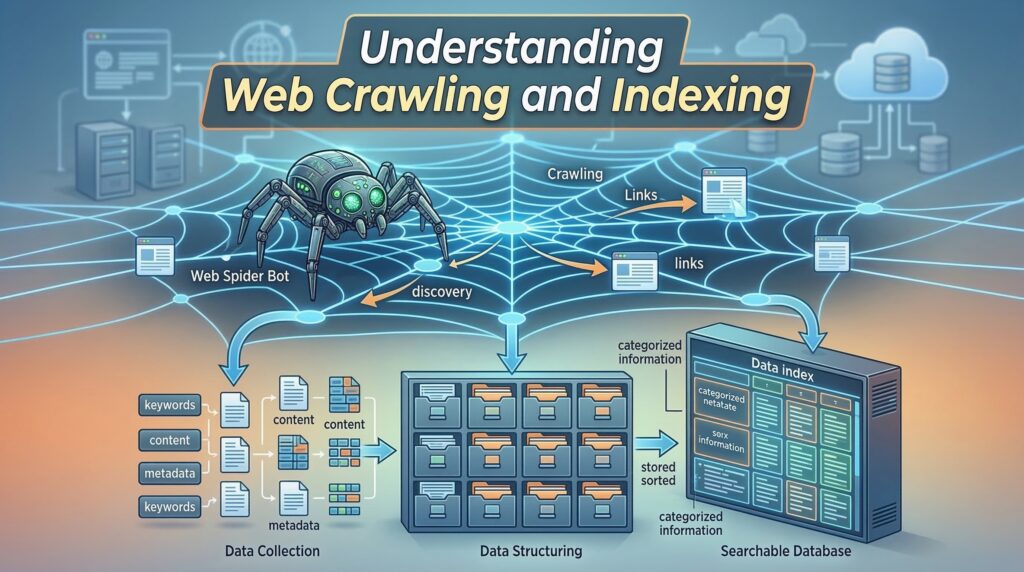
Crawling and indexing are key steps in how search engines find and show your website’s content. To know why your page might be crawled but not indexed, it’s important to understand these steps. Many site owners search for answers to why crawled not indexed affects their new content.
What is Web Crawling?

Web crawling is how search engines find new and updated content online. They use software called crawlers or spiders to scan the web. When a crawler visits your site, it reads your content and follows links to other pages.
Here are the main parts of web crawling:
- Discovery: Crawlers find new URLs and check for updates on known ones.
- Content Analysis: The crawler looks at the content to see if it’s relevant and makes sense.
- Link Following: Crawlers follow links on your site to find new pages and understand your site’s layout.
What is Indexing?
Indexing is when search engines store and organize the content they find. When a search engine indexes your content, it adds it to its huge database. This database is called an index, where it can be found when someone searches for something. A common question is why crawled not indexed appears even after Google has analyzed the page.
Indexing includes:
- Content Storage: The content is stored in a huge database.
- Organization: The content is organized so it can be easily found.
- Analysis: The content is checked for relevance, quality, and context to see how it ranks in search results.
How Do They Work Together?

Crawling and indexing work together to make your content visible in search results. Crawling finds and updates content, while indexing makes it searchable. If your page is crawled but not indexed, there might be problems with its quality, relevance, or technical aspects.
To show this, consider the following:
| Process | Description | Outcome |
|---|---|---|
| Crawling | Discovery and analysis of new and updated content | Content is identified for possible indexing |
| Indexing | Storage and organization of crawled content | Content becomes searchable and visible in search results |
Common Reasons Why Crawled Not Indexed
If your page is crawled but not indexed, knowing why is key. One of the most frequent questions in SEO forums is why crawled not indexed persists after site updates. Google’s algorithms aim to crawl and index web pages well. But, some issues can stop indexing.

Low-Quality Content
Low-quality content is a big reason for not being indexed. Google looks for content that’s valuable, informative, and engaging. If your content is thin, lacks substance, or doesn’t add value, it might not get indexed.

Examples of low-quality content include:
- Thin content that lacks depth or insight
- Content with numerous grammatical errors or typos
- Pages with significant amounts of duplicate content
Duplicate Content Issues
Duplicate content can also stop indexing. When Google finds multiple versions of the same content, it gets confused. This can mean none of the versions get indexed.
| Types of Duplicate Content | Description |
|---|---|
| Identical Content | Word-for-word identical content across different URLs |
| Similar Content | Content that is very similar but not identical across different URLs |
| Content Syndication | Content that is syndicated across multiple sites, potentially leading to duplication |
Duplicate content is a classic trigger for why crawled not indexed warnings in Google Search Console.
Manual Actions by Google
In some cases, Google’s manual actions can block indexing. This happens if your site breaks Google’s rules, like spamming or having lots of low-quality content.
To avoid these actions, make sure your site follows Google’s Webmaster Guidelines. Stay away from keyword stuffing, cloaking, and link schemes.
Crawl Budget Limitations
If your website has thousands of URLs, Google may crawl some pages but delay or skip indexing them due to crawl budget limitations.
Importance of Indexing for SEO
Getting your pages indexed is key to SEO success. Indexing lets search engines add your pages to their huge databases. This makes your content visible to people searching for it. Without indexing, your pages might not show up, even if they’re well-optimized.

When you investigate why crawled not indexed persists, you begin to realize how vital indexing is for organic search visibility.
Visibility in Search Results
To show up in search results, your pages need to be indexed. Indexed pages can appear in search results for the right queries. This is important because it helps bring more visitors to your site.
To get more visibility, make sure your site is easy for search engines to crawl. Use clear URLs and create valuable content. This helps your site rank better in search results.
Impact on Traffic
Indexed pages get more organic traffic. When your content is indexed, it can show up in many search results. This brings in a wide range of visitors.
- Increased organic traffic due to better search engine rankings
- More opportunities for your content to be discovered by users
- Potential for higher engagement rates as users find relevant content
You can mitigate traffic losses by systematically addressing why crawled not indexed notifications within the search console.
Role in Brand Awareness
Indexing also boosts your brand’s online presence. When your pages show up in search results, they help your brand be seen more. Regular visibility makes your brand a trusted name in your field.
By making sure your content is indexed, you can grow your brand’s online presence. This drives more traffic and boosts your online visibility. Keep an eye on your indexing status and fix any problems quickly to keep your SEO strong.
Technical Issues That Prevent Indexing
If your page is being crawled but not showing up in search results, it might be due to technical problems. These issues can make your website hard to find and rank on search engines.

Robots.txt File Misconfigurations
A wrong robots.txt file can block search engines from seeing your site. Make sure your robots.txt file lets crawlers see your content.
Directives in the robots.txt file can stop crawlers from seeing some pages. But if they block too much, important pages might not get indexed.
XML Sitemap Problems
XML sitemaps help search engines understand your site. But, problems like wrong URLs or not updating after new content can cause issues.
To fix this, update your XML sitemap often. Also, submit it to search engines like Google through their webmaster tools.
Proper sitemap management is a foundational step in diagnosing why crawled not indexed issues for large-scale websites.
Site Speed and Performance
How fast your site loads is key for search engine rankings. A slow site hurts user experience and indexing. To speed up your site, optimize images, use browser caching, and reduce CSS and JavaScript files.
| Optimization Technique | Description | Impact on Site Speed |
|---|---|---|
| Image Optimization | Reducing image file size without compromising quality | Significant reduction in page load times |
| Browser Caching | Storing frequently-used resources locally on the user’s browser | Reduces the need for repeat downloads, improving load times |
| Minifying CSS and JavaScript | Removing unnecessary characters from code files | Decreases file size, leading to faster page loads |
Fixing these technical problems can help your website get indexed better. This will make it more visible and attract more visitors.
Content Quality Matters
Search engines look for content that adds value to users. This makes content quality key for indexing. If your content is valuable and relevant, search engines are more likely to index it. This boosts your page’s visibility in search results.
Unique and Valuable Content
Creating unique and valuable content is essential for indexing. Duplicate or low-quality content can cause indexing problems. Search engines aim to offer diverse and relevant information to users.
To make your content stand out:
- Do thorough research on your topic to provide insightful and detailed information.
- Avoid copying content from others. Instead, offer a fresh perspective or unique insights.
- Make sure your content is well-organized, easy to read, and free of errors.
By focusing on these points, you improve your content’s quality. This makes it more likely to be indexed.
User Engagement Signals
User engagement signals, like time spent on a page, bounce rate, and click-through rate, are important. High engagement signals show search engines that your content is relevant and valuable.
To boost user engagement:
- Use catchy headlines and introductions to grab users’ attention.
- Optimize your content with relevant keywords, but keep it readable and natural.
- Add multimedia elements like images, videos, or infographics to improve the user experience.
By improving these signals, you might find a correlation with why crawled not indexed errors decreasing over time. By increasing user engagement, you not only improve your content’s quality. You also increase its chances of being indexed.
E-A-T Principles Explained
The E-A-T principles—Expertise, Authoritativeness, Trustworthiness—are guidelines for evaluating content credibility. Showing expertise, establishing authoritativeness, and building trust with your audience are key for content quality.
To apply E-A-T principles:
- Show the expertise of your content creators through credentials, experience, or thorough research.
- Establish authoritativeness by being a reliable source of information in your niche.
- Build trust by being transparent, providing accurate information, and ensuring a secure user experience.
By following these principles, you can significantly improve your content’s quality. This increases its chances of being indexed.
The Role of Meta Tags
Meta tags are key for search engines like Google to understand your web pages. They give important info about your webpage’s content. This helps search engines see if your page is relevant and where it should rank. Meta tags are powerful, but improper usage is a frequent reason why crawled not indexed messages appear in GSC.
Understanding Meta Robots Tag
The meta robots tag is very important. It tells search engines how to crawl and index your webpage. It decides if a page should be indexed or not, and if links should be followed.
You can use this tag to keep certain pages from being indexed. For example, you might not want search engines to find internal search results or thank you pages. The tag goes in the HTML head of your webpage. It can have directives like “index,” “noindex,” “follow,” and “nofollow.”
“The meta robots tag gives you control over how search engines interact with your webpage, allowing you to optimize your content’s visibility.”
Importance of Canonical Tags
Canonical tags are also very important. They help prevent duplicate content issues. They tell search engines which version of a webpage is the original or preferred one.
By using a canonical URL, you tell search engines which content to prioritize. This avoids duplication and any penalties that might come with it.
| Canonical Tag Usage | Description |
|---|---|
<link rel="canonical" href="https://example.com/preferred-page"> |
Specifies the preferred version of a webpage. |
<link rel="canonical" href="https://example.com/original-content"> |
Indicates the original content when duplicate pages exist. |
Misusing canonicals often leaves webmasters confused about why crawled not indexed happens to their preferred pages.
Header Tags and SEO
Header tags (H1, H2, H3, etc.) are not meta tags but are very important for SEO. They help structure your content and highlight important keywords. This makes it easier for search engines to understand your content’s hierarchy and context.
Using header tags well means creating a clear structure. Use H1 tags for main titles, H2 tags for subheadings, and H3 tags for further subheadings. This improves readability and boosts SEO by focusing on key points.
- Use H1 tags for the main title of your page.
- Utilize H2 and H3 tags to create a structured hierarchy of content.
- Incorporate relevant keywords in your header tags to improve SEO.
How to Check for Crawling Issues
To find crawling problems on your website, you need the right tools and methods. Crawling issues stop search engines like Google from fully accessing your site. This can lead to less visibility and fewer visitors.
Using Google Search Console
Google Search Console (GSC) is a great tool for spotting crawling problems. It shows how Google crawls and indexes your site. Here’s how to use GSC well:
- Verify your site in GSC to get detailed reports.
- Look at the “Coverage” report for indexing problems.
- Use the “URL Inspection” tool to see how Google crawls specific URLs.
Exploring Log Files
Log files record all server requests, including from search engine crawlers. They help you understand crawling patterns and find issues.
To make the most of log files, use log analysis tools. These tools give insights into crawler activity, like how often they crawl and any errors. Analyzing server logs is perhaps the most technical way to determine why crawled not indexed is occurring on specific subdirectories.
SEO Tools Overview
Many SEO tools can help find crawling problems, like Ahrefs, SEMrush, and Moz. These tools have features such as:
| Tool | Key Features |
|---|---|
| Ahrefs | Crawl analysis, broken link detection, content audit |
| SEMrush | Technical SEO audit, crawl error detection, competitor analysis |
| Moz | Crawl diagnostics, site audit, keyword research |
By using these tools and methods, you can find and fix crawling issues. This will help your website’s indexing and SEO performance.
Why Crawled Not Indexed – Fixing Indexing Issues
To fix indexing problems, start by finding the main cause. Once you know why your pages aren’t indexed, you can fix them. This ensures they get crawled and indexed right.
Updating Content Quality
Low-quality or thin content often stops pages from being indexed. To fix this, make sure your content is unique and valuable. It should also offer a great user experience. Improve your content by:
- Doing deep keyword research to see what people are looking for.
- Writing detailed guides or tutorials that solve real problems.
- Adding multimedia like images, videos, or infographics to make it more interesting.
By making your content better, you boost the chance of your pages being indexed. This also helps your website show up more in search results. Improving your articles is one of the best ways to resolve why crawled not indexed for important URLs.
Resolving Technical Errors
Technical problems can also stop pages from being indexed. Issues like robots.txt file misconfigurations, XML sitemap problems, and site speed issues are common. To fix these:
- Check your robots.txt file to make sure it’s not blocking search engines.
- Make sure your XML sitemap is right and submitted to Google Search Console.
- Make your website load faster by compressing images, minifying code, and using browser caching.
Fixing these technical bottlenecks is a proven method to reduce the frequency of why crawled not indexed alerts. Fixing these technical problems helps your website get crawled and indexed better.
Submitting Requests for Reindexing
After you’ve updated your content and fixed technical issues, you might need to ask Google to reindex your pages. You can do this through Google Search Console by:
- Submitting a reindexing request for specific URLs.
- Updating and resubmitting your XML sitemap.
Remember, reindexing takes time. So, be patient and watch your Search Console reports for updates.
Monitoring Your Pages
Keeping an eye on your website’s pages is key to keeping them indexed. Regular checks spot problems early, keeping your site visible in search results.
Analyzing Search Console Reports
Google Search Console offers deep insights into how Google views your site. By regularly checking these reports, you can find pages not indexed and why.
For example, the “Indexing Errors” report shows crawl and indexing problems. Fixing these quickly can solve website indexing issues.
Regular Audits for Health Checks
Regular audits are vital for your site’s health. They check for SEO issues like broken links and slow pages, which affect indexing.
A detailed audit also looks at your content’s quality and relevance. Making sure your content is unique and valuable is key for keeping it indexed.
“The health of your website is directly tied to its ability to be crawled and indexed correctly. Regular audits help in identifying and fixing issues that could be hindering this process.”
Regular audits act as a preventative measure against why crawled not indexed problems before they escalate.
Timely Updates and Fixes
After finding problems, it’s important to fix them quickly. This might mean updating content, fixing technical issues, or asking Google to reindex your site.
Being proactive and fixing issues fast stops crawling but not showing in search results problems. This keeps your site visible and competitive.
- Regularly check Search Console for indexing errors and crawl issues.
- Conduct thorough website audits to find technical SEO problems.
- Update and improve content quality to boost user engagement and relevance.
Learning from Competitors
Looking at what your competitors do can help you find areas to improve your SEO. By studying their strategies, you can learn how to make your website better. This means finding out what they do well and how you can do it better.
Analyzing Competitor Pages
First, find your main competitors and check out their websites. Look at their content, keywords, and technical SEO. Tools like Ahrefs, SEMrush, or Moz can give you important info about their sites.
When you’re checking out their pages, focus on:
- The quality and uniqueness of their content
- Their use of meta tags, header tags, and other on-page SEO elements
- Site architecture and how it affects user experience and crawlability
- Their mobile-friendliness and page speed
Identifying Gaps in Your Strategy
After you know what your competitors are doing, you can see where you might be falling short. This could be:
- Content gaps: Topics or keywords that your competitors are targeting but you are not.
- Technical SEO: Areas where your website may be technically inferior to your competitors, such as site speed or mobile responsiveness.
- Link building: Opportunities to acquire high-quality backlinks that your competitors have.
By spotting these gaps, you can make a plan to fix them and boost your SEO. By closing these gaps, you will likely see a reduction in the why crawled not indexed cases compared to your competitors.
Implementing Best Practices
Learning from competitors is not just about copying them. It’s about figuring out what works in your field and using that to make your own site better. This means creating great content, improving your site’s technical SEO, and getting more backlinks.
By doing these things, you can make your site more visible, get more visitors, and grow your online presence.
Best Practices for Better Indexing
To improve your website’s indexing, use the right techniques. Focus on areas that help search engines like Google crawl and index your site better.
Content Optimization Techniques
Optimizing your content is key to better indexing. Create high-quality, engaging content that adds value to your users. Make sure it’s well-researched, informative, and relevant to your audience.
Some effective content optimization techniques include:
- Using relevant keywords naturally throughout your content
- Optimizing meta tags, such as title tags and meta descriptions
- Utilizing header tags (H1, H2, H3, etc.) to structure your content
- Incorporating internal and external linking to enhance credibility
Improving Site Architecture
A well-structured site architecture helps with crawling and indexing. Organize your content in a logical and accessible way.
To improve your site architecture:
- Create a clear hierarchy of pages
- Use descriptive URLs for your pages
- Ensure that your site is mobile-friendly and responsive
- Minimize the number of clicks to reach important pages
Engaging User Experience
Providing a good user experience is vital for keeping visitors and improving indexing. Search engines prefer sites that offer a positive user experience.
To create an engaging user experience:
- Ensure fast page loading speeds
- Design an intuitive and user-friendly interface
- Make sure your content is accessible and readable
- Encourage user interaction through calls-to-action and feedback mechanisms
Conclusion: Why Crawled Not Indexed – Steps to Take Next
Now that you’ve looked into why your page isn’t indexed, it’s time to act. Knowing why your site isn’t indexed is key to fixing it and boosting your online presence.
Key Takeaways
Common reasons for indexing problems include low-quality content, duplicate content, and technical issues. Make sure your content is unique, valuable, and search engine-friendly.
Seeking Expert Help
If you’re having trouble with indexing, consider getting help from experts. They can spot and fix complex issues like crawl errors or site structure problems. Remember that solving why crawled not indexed is an ongoing process of optimization, not a one-time fix.
Resolving Indexing Issues
By tackling the problems mentioned here and following best practices, you can get your site indexed better. If pages keep getting crawled but not indexed, check your content and technical setup for improvements.
FAQ
Why is my website not appearing in search results if Google has already crawled it?
Sometimes, Googlebot visits your page but doesn’t add it to search results. This might happen if your content is seen as low-quality or thin. Even with a good technical setup, Google looks for value for its users. If your page doesn’t offer something new, it might not be indexed.
What are the most common technical reasons pages not indexed by search engines?
Technical issues often come from your robots.txt file or meta tags. For example, a “noindex” tag or a “Disallow” directive in your robots.txt tells Google not to show your page. Also, incorrect canonical tags can point Google to another version of your page, leaving the current one unindexed.
How can I start troubleshooting indexing errors on my site?
Start by checking Google Search Console. Use the URL Inspection tool to see your page’s status. It will show if the page is “Crawled – currently not indexed” or if there are indexing problems like redirect errors.
Can site performance cause a website not showing up on Google?
Yes, site speed and performance are key. If your server is slow or times out often, Googlebot might give up. Even if it crawls the code, it won’t index if it can’t render the page quickly. Improving your Core Web Vitals helps search engines process your site better.
Why am I crawling but not showing in search results despite having unique content?
Even with unique content, indexing problems can occur. Your site might lack internal linking or a clear XML sitemap. Google needs to understand your page’s place in your site’s structure. If a page is “orphaned,” Google might not index it, even if it crawls it.
What should I do if I find my pages are not being indexed due to E-A-T concerns?
Google values Expertise, Authoritativeness, and Trustworthiness (E-A-T) a lot. In sensitive niches like finance or healthcare, your content must be credible and have clear authorship. Update your “About Us” page, cite sources, and ensure your content is high-quality and trustworthy.
How can analyzing competitors help when my website is not appearing in search results?
Use tools like Ahrefs or Semrush to compare your site with competitors. If their pages are indexed and yours are not, check their site structure, content depth, and keyword usage. This helps you find and fix the gaps in your site.
Is it possible to fix indexing problems by simply requesting a re-crawl?
Requesting a re-crawl via Google Search Console is a good step, but only if you’ve fixed the issues first. If you haven’t improved content quality or resolved technical problems, Google will likely reach the same conclusion. Always fix the root cause before asking for a re-crawl.